


Salotto
3.639.00 Reviews
App Specs
- Version
- 3.16.0
- Updated On
- License
- Free
- Downloads
- 10,000+
- Developer
- Salotto LLC
- Categories
- Sports
- Platform
- Android
Screenshots
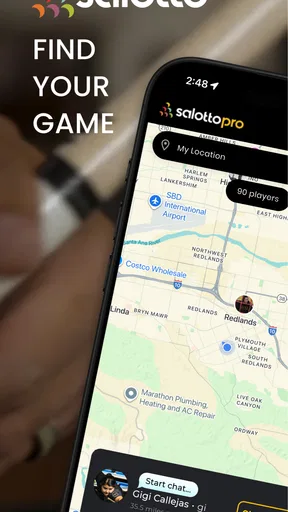
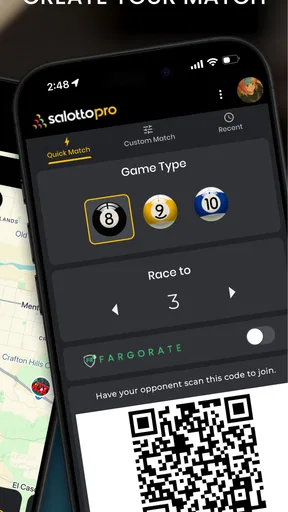
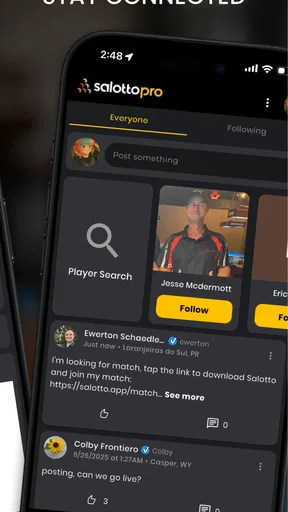
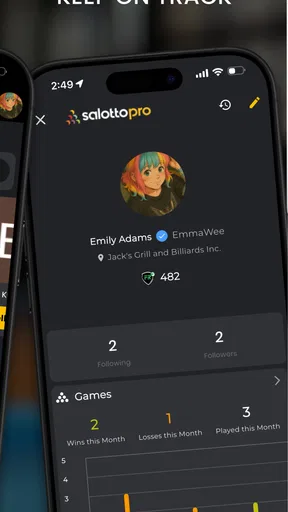
 Analysis by AppCompare
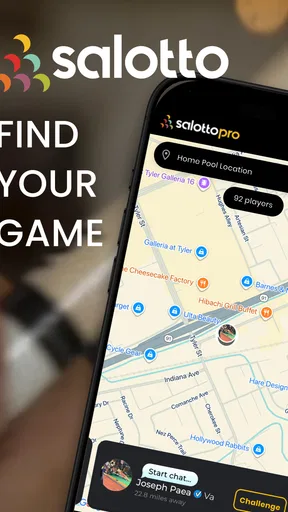
I installed Salotto because finding a pool game is often harder than playing one. A table may be available, but the people who want to use it are scattered across different chats, clubs, or social circles. This free sports app from Salotto LLC takes a community-first approach: it is built around helping pool players find games, play with others, and host sessions rather than simply recording scores or teaching technique.
That focus makes it interesting for a household or group of friends sharing an interest in pool. One person can be looking for a casual game while another wants to arrange a session, and the app gives those activities a more suitable home than a general messaging thread. My overall impression is positive but measured. Salotto has a clear purpose and can make local coordination easier, yet its usefulness depends heavily on whether enough suitable players are active around you.
How Salotto fits into a shared pool routine
The most convincing use case is a home where pool is a regular activity but schedules rarely line up. Imagine one person finishing work early, another returning later, and a friend who is willing to join only if the timing is clear. Instead of sending separate messages and waiting for replies, the app can serve as the place to look for a game or organize one. That is a practical difference, especially when the goal is participation rather than competition tracking.
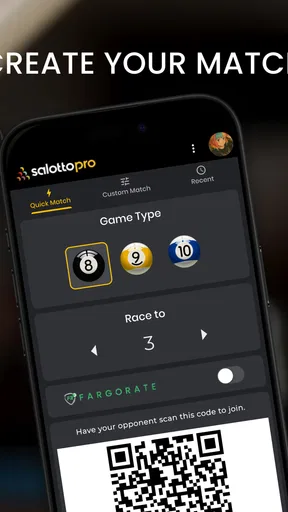
I would also use it for a small circle of players who already know one another but do not always remember who is available. A host can create the starting point for a session, while others can respond through the community. This is more structured than a casual text saying, “Anyone playing tonight?” and less formal than joining a large organized league. For occasional players, that middle ground is probably where the app feels most natural.
There is a useful household distinction here: Salotto is not a replacement for a shared calendar, a family chat, or a pool-training app. It is better viewed as a dedicated meeting layer for pool-related plans. I would still use a normal calendar for recurring commitments and a private conversation for sensitive household matters. The app’s value comes from connecting the right people around the activity, not from trying to manage every part of home life.
Why the community matters more than the download count
Salotto has passed ten thousand installs, but that figure should not be treated as a guarantee that a busy local player base is waiting nearby. Pool is a location-sensitive activity. A community can be useful in one area and quiet in another, depending on who has joined and how often they use it. This is the main trade-off I would explain to a friend before recommending it.
Before relying on the app for an important evening, I would open it several times across different days and check whether the activity feels current. I would also begin with a low-pressure plan rather than assuming that a last-minute request will immediately produce a game. That small habit avoids the most common disappointment with community apps: mistaking a broad install figure for local availability.
Worth Reading Before You Choose

Baby Panda World Brings Quick Play to Modern Phones, but Its Game Library Feels Busy

ESPN’s Live Game View Makes Following Close Games Easier

QuizzLand Review: A Good Fit for Short Trivia Breaks, Not Every Player

Basketball Stars: Multiplayer Is Fast, but Can It Recover When Matches Go Wrong?

WEBTOON Turns Phone Updates Into a Better Reading Routine

Link to Windows Runs on Shared Habits, Not Social Feeds
The app is free to install, which makes this trial easy. Its content rating is Teen, so I would treat it as an app for older teenagers and adults rather than something to hand to a young child as an unsupervised social tool. In-app purchases range from $0.99 to $49.99 per item, so I would review any purchase prompt carefully, particularly on a device used by more than one person.
Setting up boundaries on a shared device
Shared-device use needs a little thought. If several people in a household use the same phone or tablet, I would avoid treating one open session as a neutral family dashboard. A pool community app can involve personal conversations, availability, and interactions with people outside the home. Each regular user should understand whose account is active before posting, responding, or hosting anything.
My practical setup would be simple: one person signs in, checks the active account, finishes their coordination, and signs out or hands the device back clearly. I would not let a child or guest casually post from another person’s profile. That is not a criticism unique to Salotto; it is the basic risk of using any social or community service on a shared screen. The important point is that the app’s convenience should not blur account ownership.
I would also keep household plans separate from public arrangements. If the family is deciding who can attend, what time works, or whether someone needs a ride, that conversation belongs in a private channel. Salotto can help identify the game or host, but it should not become the only place where practical household decisions are made. This division makes the app easier to use without exposing more personal detail than necessary.
Another useful habit is to agree on a naming convention within the household. If two people have similar names or both play regularly, using a clear profile identity can prevent confusion when arranging a session. I would not add private information simply to make a profile look complete. For a community app, clarity is helpful, but oversharing is not a requirement for finding a game.
Coordinating a game without creating message chaos
Salotto’s strongest idea is the shift from scattered invitations to a pool-specific community. I would use it at the beginning of the planning process: decide whether I want to find a game, join one, or host one, then give the basic information needed for another player to understand the invitation. The fewer assumptions a post contains, the easier it is for someone else to respond.
For example, a useful invitation should make the timing and general expectation clear rather than relying on a vague “play?” message. If I am hosting a relaxed session, I would say so. If I am looking for a more focused practice game, I would make that clear too. This is not about sounding formal; it reduces the back-and-forth that usually makes group coordination tiring.
A second practical insight is to confirm plans before leaving home. Community responses can change, and a digital invitation is not the same as a guaranteed appointment. I would use Salotto to start the connection, then confirm the final arrangement in the most appropriate conversation. That extra step matters when travel, table access, or another person’s schedule is involved.
For recurring play, I would resist creating a new arrangement every time if the same small group already has a reliable routine. Instead, the app can be most useful when someone is missing, a new player is needed, or a host wants to open a session to a wider circle. In other words, its value may be highest as a flexible backup and discovery tool, not necessarily as the sole system for a fixed weekly appointment.
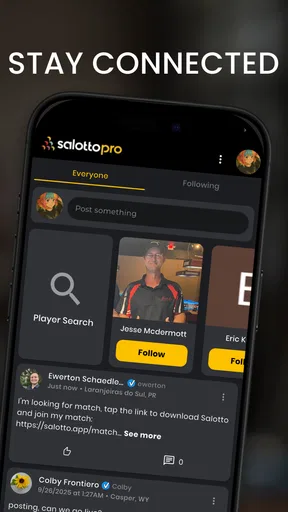
This is where Salotto compares favorably with ordinary alternatives. A messaging app is familiar, but invitations can disappear inside unrelated conversations. A general social network may reach more people, but it is not centered on pool. A calendar is excellent for timekeeping, yet it does not help find a player. Salotto sits between those options by keeping the activity itself at the center.
What it is not designed to replace
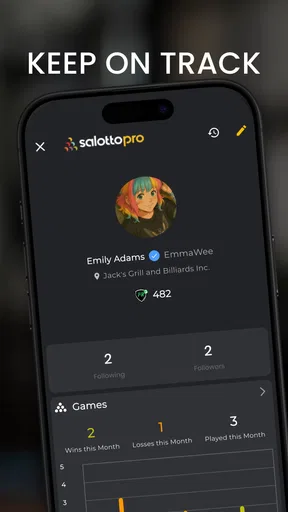
I would not choose Salotto if my main goal were technical improvement. Someone looking for drills, instructional videos, detailed statistics, or a structured training plan should use a specialist coaching resource instead. The app’s identity is social and organizational: it helps people connect around games. Expecting it to function as a complete practice journal would lead to frustration.
It is also not the obvious choice for someone who wants a fully private household-only experience. The community concept is the point, so a person who never wants to interact beyond known family members may prefer a private group chat. Likewise, a highly organized club with established booking software may find its existing system more efficient for formal schedules, even if Salotto remains useful for discovering additional players.
The app’s average rating is 3.6 from 73 ratings, with 39 written reviews. I read that as a sign to keep expectations realistic rather than as a reason to dismiss it. A community service can feel excellent when it solves a local coordination problem and ordinary when the surrounding network is quiet. The rating reflects that this is not a universally effortless experience, so I would test it personally before building an important routine around it.
Age, trust, and sensible participation
The Teen content rating deserves attention in a shared household. It does not make Salotto unsuitable for every teenager, but it does mean I would discuss basic boundaries before allowing independent use. A young person should know not to share a home address, school details, travel plans, or other identifying information with someone they have only encountered through the community.
I would also make sure a teenager understands the difference between joining a public game and meeting someone privately. For a first interaction, a visible, established venue and an informed adult are sensible precautions. The same advice applies to adults who are new to a local community. A pool connection may be friendly, but online familiarity is not the same as real-world trust.
Households should decide who is allowed to host, who can accept invitations, and what information may be shared. Salotto can support coordination, but it cannot substitute for those family rules. I would be especially careful with a shared payment method because the app includes optional purchases. The free entry point is convenient, while the range of purchase prices means account and device boundaries still matter.
Trust also affects the quality of the community. I would respond clearly when plans change, avoid leaving hosts waiting, and not accept an invitation simply to keep options open. Those small behaviors make a community app more useful for everyone. In my experience, the best results come when users treat it as a coordination space rather than an endless stream of disposable requests.
Version, access, and everyday practicality
The current version is 3.16.0, and the app supports devices running Android 7.0 or later. That gives it a reasonably broad compatibility range for Android users, including some older phones that are still used as shared household devices. I would still update the app before relying on it for a planned session, especially if several people use the same device and one person has not opened it recently.
Because Salotto is free, the initial decision is not about paying an entry fee. The more important question is whether it fits the way I already arrange pool. If I usually struggle to find opponents, hosts, or nearby players, it is worth trying. If I already have a dependable group and a clear booking routine, the app may be an optional extra rather than a necessary tool.
One subtle advantage of using a dedicated pool app is mental separation. When a game request lives in a work chat or a family messaging thread, it is easy to miss or answer at the wrong time. Keeping pool coordination in its own context can reduce that clutter. The downside is that it creates another place to check, so the benefit depends on actually opening it regularly.
My household verdict after weighing the trade-offs
I recommend Salotto to pool players who want a focused way to find, join, or host games and who are willing to judge it by the activity in their own area. It is particularly appealing for casual players, newcomers trying to meet others, and households where several people enjoy pool but have trouble coordinating schedules. The community angle gives it a purpose that a score tracker or general chat cannot fully reproduce.
I would skip it if I wanted private family scheduling, advanced coaching, or a guaranteed supply of opponents. I would also avoid making it the only plan for a time-sensitive event until I had seen how responsive the local community was. That is the central limitation: the app can organize connections, but it cannot create a lively pool scene where one does not exist.
For a shared device, my recommendation comes with clear boundaries. Keep accounts distinct, confirm who is posting, discuss age-appropriate participation, and handle private household details elsewhere. With those habits, Salotto can be a useful bridge between “we should play sometime” and an actual session. Its best feature is not replacing every tool around pool; it is giving pool coordination its own place.
After considering the free access, Teen rating, Android compatibility, optional purchases, and modest rating history, I see it as a worthwhile trial rather than an automatic must-have. Install it, explore the community at different times, and try one simple arrangement before committing to a regular routine. If the right players are active, Salotto can make casual pool plans noticeably easier. If they are not, a private group chat or an established local club will probably serve you better.
Pros
- Simple interface makes joining conversations quick and approachable.
- Supports casual social interaction without requiring advanced technical knowledge.
- Useful for discovering new people with similar interests.
- Conversation-based format can encourage more personal connections.
- Available on mobile
- making chats convenient while traveling or relaxing.
Cons
- Public conversations may expose users to unwanted messages or behavior.
- The quality of interactions can vary greatly between rooms or communities.
- Some features may depend on an active user base in your region.
- Privacy settings should be checked carefully before sharing personal details.
- Notifications may become distracting during periods of frequent activity.
FAQs for Salotto
What is Salotto and what can I use it for?
Salotto is a social communication app designed to help people connect, chat, and take part in conversations from their mobile devices. Depending on the available features and your region, you may be able to create a profile, discover other users, join discussions, and exchange messages. It is best suited to users looking for a casual online community rather than a traditional productivity or messaging tool.
Is Salotto free to download and use?
Salotto can generally be downloaded at no initial cost, but some features may depend on in-app purchases, subscriptions, advertising, or other limitations set by the developer. Before using the app extensively, check its store listing for current pricing and review the payment terms shown inside the application. Availability of premium functions may also vary between Android and iOS.
Do I need to create an account to use Salotto?
Most social apps require some form of registration so they can manage profiles, conversations, and community interactions, and Salotto may work in a similar way. You should expect to provide basic information such as an email address, phone number, or sign-in through a supported third-party service. Read the registration screen carefully and avoid sharing more personal information than is necessary.
Is Salotto safe for chatting with other people?
Salotto should be used with the same caution as any app that allows interaction with strangers. Do not share your home address, passwords, financial details, private documents, or sensitive photographs. Use blocking and reporting tools whenever available, and review the privacy settings before starting conversations. Parents should also check whether the app is appropriate for younger users and supervise activity when necessary.
What permissions and device requirements does Salotto have?
The permissions required by Salotto can depend on the features you use and the version installed on your device. A social app may request access to notifications, photos, the microphone, or the camera when those functions are available, but you can review and manage permissions through Android or iOS settings. Install the latest compatible version and make sure your device has sufficient storage and a stable internet connection.


